
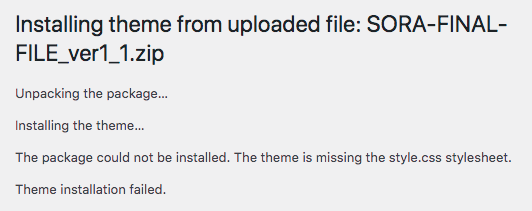
This error does NOT mean the theme is broken.
It happens when WordPress is uploading the wrong file.
You are most likely uploading the full download package instead of the actual theme (or you are uploading the recipe template file)
After you download the product, you must unzip the main download first. Inside, you will find the real theme file.
Please follow:
- Download the theme file yoou just purchased
- Unzip the main download package on your computer
- Open the extracted folder
- Locate the correct theme file example →
themename.zip - Go to WordPress → Appearance → Themes → Add New → Upload Theme
- Upload themename.zip (do NOT upload the whole package)
Do not upload:
- the “documentation” folder
- the “demo images” folder
- the main download package
Only upload the theme .zip file.
Important for Genesis & Kadence users:
You must install the parent theme first, then install the child theme.
If you upload the wrong file, WordPress cannot find the style.css file and shows this error.